
DialogManager
DialogManager resolves registered dialogue IDs, starts graph sessions, and exposes lifecycle events. Use the prefab and ID registry for ordinary scene playback.
Scene setup
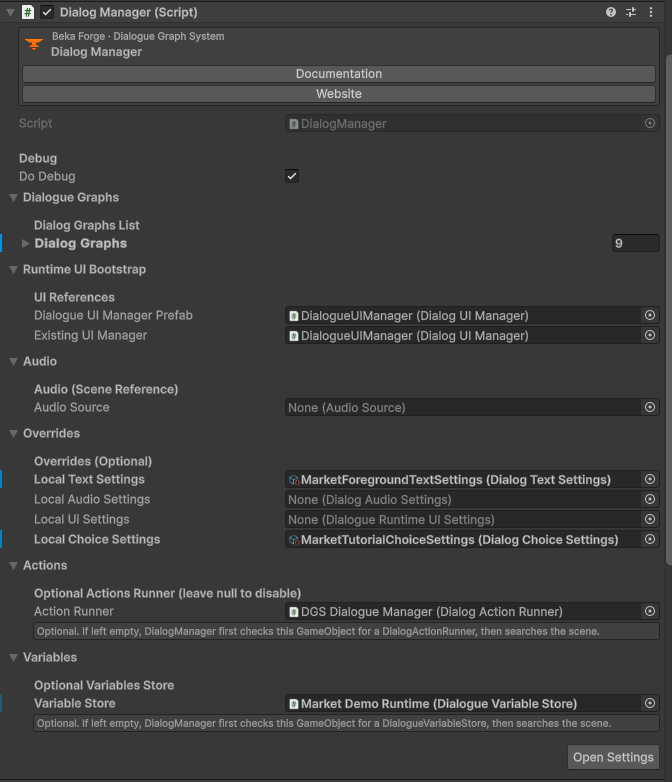
- Drag
Assets/DialogGraphSystem/Resources/Prefabs/DialogueManager.prefabinto your scene. - On the Dialog Manager component, add an entry to
dialogGraphs, assign aDialogGraph, and enter a unique non-emptydialogID. - Keep the prefab's assigned
DialogUIManagerand UI references. Use Runtime UI if you are replacing or customizing them. - Call
ValidateDialogRegistryfrom your own tooling if you assemble the list dynamically. For inspector-authored mappings, check blank or duplicate IDs before relying on them.
Expected result: PlayDialogByID resolves exactly one graph and starts it with the configured runtime UI.
Start by ID
using DialogSystem.Runtime.Core;

public void OpenConversation()
{
    DialogManager.Instance.PlayDialogByID("market_intro", OnConversationEnded);
}

private void OnConversationEnded()
{
    // Continue your scene flow here.
}
The ID must exactly match one entry in the manager's dialogGraphs list. Keep the ID non-empty and unique. If there is no unique mapping, the manager refuses the lookup rather than choosing an arbitrary graph.
Start a graph asset directly
using DialogSystem.Runtime.Core;
using DialogSystem.Runtime.Models;
using UnityEngine;

public class DirectGraphLauncher : MonoBehaviour
{
    [SerializeField] private DialogGraph graph;

    public void Play()
    {
        DialogManager.Instance.StartDialog(graph);
    }
}
Use this overload when you intentionally hold a direct graph reference. It does not choose a registry ID for you; use PlayDialogByID when you want a stable scene-facing mapping.
No-code launch with DialogPlayer
Add DialogPlayer to a scene object, then bind a UI Button's On Click () event to DialogPlayer > StartDialog (string) and enter the registered ID. The component also exposes StartDialogGraph(DialogGraph) for a direct graph reference and StopDialog() for a stop button.
Useful lifecycle events and state
onDialogEnterandonDialogExitidentify the start and exit of a dialog session.onDialogEndedWithReasonreports why a session ended;OnDialogEndedWithResultexposes the richer completion result.OnLineShownandOnChoicePickedlet scene systems observe conversation progress.OnConversationResetreports reset behavior.GetLastPlayedDialogTranscript("market_intro")returns the last transcript available to the manager.ToggleAutoPlay()controls the current session's auto-play behavior.
Check the public declarations in DialogManager.cs for exact delegate signatures when subscribing from code; event payloads are strongly typed and should not be guessed from their names.
Common failure checks
- No mapped graph: check the assigned asset and spelling of
dialogID. - Blank or repeated ID: give each entry a unique stable key; do not use the graph filename as an implicit runtime ID.
- Session starts without UI: confirm an active manager and its Dialog UI Manager/controller references are present.
- Direct graph call works but ID call does not: repair the manager registry; a direct graph reference bypasses the ID mapping by design.